

Authenticating users
When receiving a ticket on tinydub, we don’t know whether or not the email associated with the ticket actually belongs to any of your customers. By adding a widget, you can use parameters to authenticate a user. By doing so, the user does not need to enter their name or email when creating a ticket.
To prevent bad actors from impersonating your users and submitting any email to our widget via Javascript, we use the HMAC-SHA256 algorithm. You can generate a signed hash of the user’s email and provide it as the hash parameter, utilizing the authentication key found in your workspace settings.
When we receive the hash, we will use the same key to hash the email address you provided and then compare this hash to the one you sent us. If the two hashes are identical, we will treat the email as valid and verified.
This is different from our automated email verification.
Obtain authentication key
You can find the authentication key within your workspace settings. If needed, you can regenerate a new key at any time. When doing so, please make sure to update your implementation, as the old key will stop working.
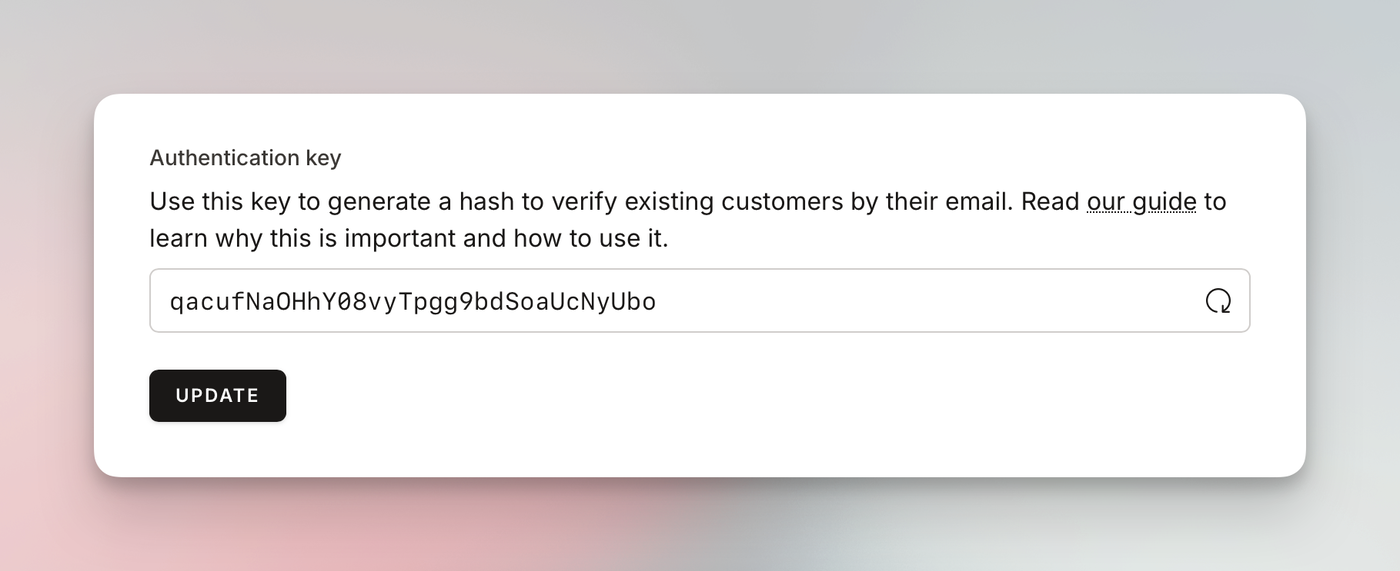
Hashing the email
To hash an email, you will need to use the HMAC-SHA256 mechanism. Below, you can find a few examples of how to do this. Use AI to generate the code for the programming language of your choice.
// PHP return hash_hmac('sha256', 'hello@example.com', 'qacufNaOHhY08vyTpgg9bdSoaUcNyUbo');// JavaScript var hash = CryptoJS.HmacSHA256("EMAIL-ADDRESS", "AUTH-KEY");return CryptoJS.enc.Base64.stringify(hash);// NodeJS const crypto = require('crypto');const secret = 'AUTH-KEY';const message = 'EMAIL-ADDRESS'; const hmac = crypto.createHmac('sha256', secret);hmac.update(message); return hmac.digest('hex');Hashing should be performed on the server side.
Make sure not to expose your key on the application’s frontend. If users gain access to this key, they could hash any email address and impersonate other users.
After that, you can add this hash to the embed snippet as shown in the example below. For more information about embedding a widget, refer to this article.
<script src="https://widget.tinydub.com/embed.js" data-tinydub-widget="WIDGET-ID" data-tinydub-autostart="true" data-tinydub-email="hello@example.com" data-tinydub-hash="c5fcb244c8fe8a0e718cf02e556781a9bb81fbba4551c6e6623b6c5d871f9875"></script>Be aware that the hash is case sensitive.
If you generate the hash using an email with uppercase characters but assign the data-tinydub-email attribute in lowercase, the hashes will not be identical.
Unauthenticated users
If you place the widget on your marketing page, where you don’t have logged-in customers, you won’t be able to pass any customer related attributes to the widget. Because of that, any ticket created that way will be from an unauthenticated user. We will show a warning when viewing a ticket.
Once the unauthenticated user replies to a ticket, the status changes automatically.